SMS Assistant
[GitHub Repo]A Python SMS bot using the Twilio API and providing a variety of features such as real-time train times, stock price information and AI integration
Overview
The SMS Assistant is a Python and Flask application that I originally built to make my university commute easier. It began as a service that allowed me to obtain live train times for my most commonly used routes through SMS, rather than having to enter the date, time, and route on the train provider's website. As I continued developing the service and adding features, it expanded into a personal assistant that can provide live stock market information, answer questions by using AI, and log all these interactions in SQLite.
This application currently runs 24/7 on my personal Homelab using Docker Compose. When a user sends a text message to the Twilio phone number, Twilio forwards the message to the
Flask /sms webhook, where the application reads and interprets the text to see what command it is calling. Once the command is recognised, it routes the request to the appropriate service. My
setup uses Cloudflare Tunnel so that the Flask webhook is accessible to Twilio securely through the internet. The use of Cloudflare Tunnel means that I do not have to open ports on my home
router which reduces the exposure of my home network.
This project was my first time deploying and maintaining an application that runs continuously on a server, while my previous projects had only ran locally. I gained valuable experience about servers, Cloudflare Tunnels, Docker Compose and networking due to the new challenges and obstacles provided by developing software that runs on a server. Hosting this on my own personal homelab instead of renting a server also gave me more insight and experience as I personally had to configure my homelab for this purpose.
Tech Stack
- Backend & Data: Python, Flask, SQLite
- External APIs: Twilio (SMS), Google Gemini Flash AI (via OpenRouter), Realtime Trains API, yfinance
- Infrastructure: Docker Compose, ZimaOS (Homelab OS), Cloudflare Tunnels
Image of SMS Assistant in Action
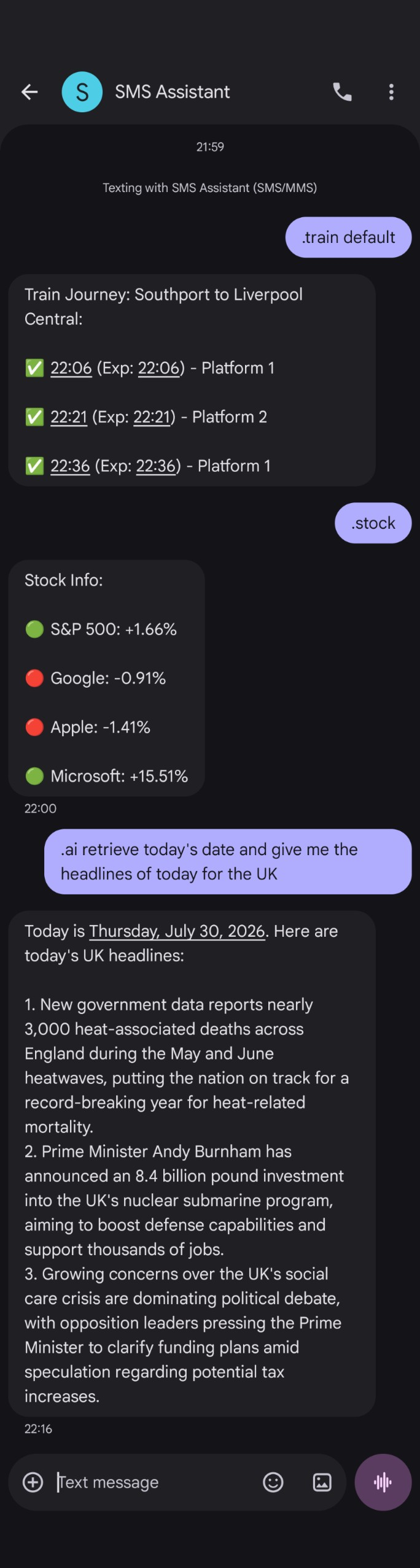
Technical Implementation
File Structure / Code Structure
textapp.pyMain Flask app and command routerservices/ai.pyAI chat, conversation history, OpenRouter integrationtrains.pyLive train times via Realtime Trains APIstocks.pyStock prices via yfinancedatabase.pySQLite message logging
docker-compose.ymlContainer configurationrequirements.txtPython dependencies.envAPI keys and secrets
When I started working on this bot, it only had 1 feature, fetching the train times, so at that point I had everything within one file, textapp.py, that handled
all the API calls and message processing. However, as more services were added to the SMS bot, it became more and more inconvenient to have everything in one file and it made sense
to refactor my code to improve maintainability.
I added a new branch to my repo because, at that stage,
I was adding the real-time stock price feature whilst I was trying to refactor my code.
I separated these 2 updates within my code into 2 different Git branches so that I could work on either task separately.
I started my refactor by adding a new folder /services where
I placed Python files that corresponded to a new feature, such as stocks.py. I created functions for these different services that I'd import into the main
textapp.py. Examples of these functions include grab_trains() and grab_stocks() which would get called if the user texted the train or stocks command.
This led to a way more readable and manageable codebase, making it easier to add new features in the future. It separated the command logic from the routing and Flask framework code.
Main Code (textapp.py)
The way textapp.py works is that it utilises the Flask framework to expose a /sms endpoint which is constantly listening for POST requests from Twilio, as
Twilio sends a POST request every time that a message is sent to your Twilio assigned phone number. This POST request from Twilio will include the actual text from the user
and the user's phone number that the text was sent from.
Once I get this request, I have to parse the text into something that is standardised so that my code can read it. This includes separating the phone number and the actual text into their own variables to store that data. I also make the text fully lowercase so that even if a command is written in with a capital, without a capital, or written with random capitals, my program can still recognise the command.
This normalised text is then compared against my commands using a relatively new feature in Python that other languages have had for a while, a match/case statement.
The statement checks whether the user has input a command and whether the user has provided a parameter for that command. An example would be the stock command as the user can
specify a certain stock by inputting a ticker such as .stock AAPL, which would text you back the Apple stock percentage change today.
Train service (trains.py)
Surprisingly, the original feature of this app was the hardest to implement, not because it is hard to implement, but because finding the appropriate API and having it work was way harder than expected. At first, I thought the best way to go about this was to find the official API, and there is one provided by the UK Government itself. It involves a website called the 'Rail Data Marketplace' which is a central hub for data on trains and it includes an API called the 'Live Departures Board', which was exactly what I needed. It worked mostly okay for a while but had a problem of not being able to give me times of stations that weren't at the beginning or end of the route. However, that wasn't a big problem for my use case as I take the full train route from start to end.
The problem with using this API was a mix of a simple common mistake, unusual
implementation, and how the API was designed. I made a classic mistake of leaking my API key in a git commit as I forgot to include a test file that I was testing the API with,
in my .gitignore. This simple mistake stalled my project for weeks. I thought it would be as simple as regenerating my API key and rotating it out, however
the way the API was designed didn't allow this. I thought terminating my API 'contract' within the marketplace would fix this but it fully locked me
out of the API and didn't allow me to get a new key, or even use the old key. I took the next step and emailed support, thinking they could quickly
solve this by giving me a new API key, but after weeks of infrequent communication, I decided that looking for a different approach would yield better results.
I found another API called Realtime Trains which is free for non-commercial projects. It ended up being a way better API anyway as it includes more data, such as precise platform numbers and status updates, and gives you an expected time if a train is delayed. It also solves the issue of intermediate stations not providing arrival times and allows you to regenerate and rotate your API keys. A challenge with this API though, was that having the API key wasn't enough, you had to generate access tokens with the API key, however this was easily implemented by just asking for an access token every time the program requested train information. This might not work if there were tons of requests and tons of users, however for a small scale personal project, this worked. The next step was just parsing the JSON data and determining what data is needed/useful, and how to package this as a SMS message to the user. This whole experience showed that even a feature that I thought would be easy to implement can turn out to have unexpected challenges.
Stocks service (stocks.py)
Adding real-time stock price information to my SMS bot was the easiest feature to implement during this project. This was due to a Python package doing most of the
work for me, that package being yfinance. yfinance basically acts as a web scraper that scrapes the Yahoo Finance website. This approach might have some problems
if we're sending out thousands of requests a second or have thousands of users, as Yahoo Finance could rate limit or IP ban you for the constant pinging and requests made to its
website. However, for the small scale personal project that I am working with, this is the perfect implementation as it makes adding the feature easy and simple as the package
handles the hard part.
My implementation compares stock prices from the two most recent trading days (this is important as the stock market shuts down on weekends) and shows the percentage change between the closing price of the previous active day and the last price available, whether it is the current active price or Friday's closing price if you're checking during the weekend. The reason I show the percentage change rather than the raw stock price is that I am using this feature mostly to keep up to date on my current investments, and the percentage change matters way more than the raw current price figure to me. I also added a default S&P 500 and Tech mini portfolio that it checks if you don't specify a ticker, checking for: S&P 500, Google, Apple, Microsoft. This is again due to my personal usage of this feature as I am generally invested in the S&P 500 and Tech and I want to see generally how that market moves so I added that. This implementation allows me to quickly check the percentage change of markets that I am interested in or directly invested in via SMS.
AI service (ai.py)
Prompt Design & Conversation Memory
Adding AI to my SMS Assistant started off with a simple implementation which became more complex as I continued to improve it. I started off by choosing the OpenRouter API as my AI provider, as it allows you to easily integrate AI within your code and allows you to easily swap models. After that, the next step was writing a system prompt that was appropriate for my use case. There are certain constraints within SMS that needed to be taken into consideration for the system prompt. One of those constraints are that AI models will often use Markdown formatting to manipulate with text, such as making it bold or italic, however SMS clients will not recognise this. Another constraint that has to be accounted for is that standard SMS has a 160 character limit per segment and Twilio charges per SMS segment. I also had the trial version of Twilio at the time which did not allow for more than 1 SMS segment per message. This made it important to keep AI answers short.
This resulted in this system prompt.
The system prompt declares the AI's purpose and role, allowing the AI to know what to communicate and how to communicate. The system prompt clearly tells the AI how to format its output so that it can be sent via SMS. The system prompt tells the AI to keep the messages short to reduce Twilio SMS costs and also to keep the output length appropriate for the use case. The system prompt also tells the AI to still format lists and schedules via multiple lines as telling the AI to keep messages short might have reduced the readability of messages that include lists or public transport schedules.
There were several problems with this first version of my AI feature. Firstly, my original AI implementation was stateless, which meant that it had no memory. Most AI chatbots or systems have some sort of memory of previous interactions so that you can ask follow on questions such as 'How long is the train ride from Liverpool to London?' and then ask it 'What is the weather there?' and it will understand from the context that 'there' means London. The way you implement this memory within the AI is quite interesting because there isn't a special memory function within AI. For the AI model, each request is a blank state and it only works with the input/prompt that you include.
Therefore, the way you implement memory within an AI chatbot is you give it the conversation history with every new request. You also need to implement something called Role Based Message Formatting,
as a way to differentiate between the user's prompts and the AI's responses. The way you'd implement this is to format the conversation history as a structured array
with every message having a designated role identifier that declares the message as 'user' or 'assistant'. This allows the AI to better understand the conversation history
and have the context of previous interactions.
Here is an example of how this is structured, with the first entry containing the system prompt under the system role, followed by the conversation history:
[
    {"role": "system", "content": "You are a personal assistant..."},
    {"role": "user", "content": "How long is the train to London?"},
    {"role": "assistant", "content": "The train takes roughly 2 hours."},
    {"role": "user", "content": "What is the weather there?"}
]
Another thing to consider with the conversation history implementation is that I needed to link the conversation history to specific users, and although I don't have other users except myself for
this code, this is just good practice and good future proofing. Therefore I made a Python dictionary called conversation_history and had it use the phone number that was texting
the bot as a key for the dictionary, to store my conversation history array. I also needed a way to limit the size of conversation history as the bigger the conversation history is,
the more input tokens the AI takes, which increases the AI usage cost. Therefore I decided on a conversation history limit of 20 messages, with it deleting
the oldest message to make space for the newest message if you go over the 20 message limit.
Date and Time Awareness & Webhook Timeouts
There was still another problem with my AI implementation that needed to be improved. AI does not know the current date and time unless explicitly told. The AI did have access to tools through the OpenRouter API that allow it to retrieve the current date and time and search the web for information. However, the AI model does not use these tools unless it deems the use of those tools to be necessary, resulting in the model often being confidently wrong in the date rather than checking. The solution was to change the system prompt every time that the AI command is requested and have the time and date appended to the system prompt. I discovered this issue when I asked for certain information, such as the top news headlines for today, and it returned a different day's news headlines. I also had it give me results for sports matches that were from ages ago, saying it was today's results.
There was still one more problem to solve. All my other SMS Assistant commands relied on the Twilio webhook. It would send me the text that it received and then wait for a response from my server about what to send back to the user. The Twilio webhook requires this to be done within 15 seconds, and that is a long time especially in internet and networking terms. However, with the added layer of latency that interacting with AI includes, the Twilio webhook would time out before receiving the message it needed to send back. AI response latency was also unpredictable as sometimes the AI model could get there in time for the 15 seconds if you had a basic request or the AI servers weren't being used much. However, with longer responses or at peak hours, the response would not arrive before the webhook timed out.
The solution to this is something called multithreading. Usually code that runs is single threaded, which means that it can only do one task at a time. It goes line by line and only moves on to the next line if the previous line of code has ran. Multithreading allows your program to work on multiple tasks at the same time.
Within my program, 90% of my code is single threaded and just goes line by line. However, once the AI function is selected by the user, the program
separates into 2 tasks, the original webhook task where it now returns a 200 OK message to the webhook to tell it that we aren't doing anything within its 15 second window,
which closes the webhook connection. The other task (the background task) runs my ai_threading_task() function that asks the AI the user's prompt, waits for the response back,
and then sends a request to the Twilio API to send the AI response back to the user.
Below is an attached code snippet of this multithreading implementation:
@copy_current_request_context
def ai_threading_task():
    ai_answer = ask_ai(question, sender_number, AI_client)
    instant_send(ai_answer, sender_number)
    saveMessageDatabase(sender_number, incoming_request, ".ai", ai_answer)

thread = threading.Thread(target=ai_threading_task)
thread.start()

return "",200
Database service (database.py)
After implementing conversation memory for the AI service, I wanted a more robust way to log messages and responses. I also saw this as an opportunity to gain hands on experience with SQL, since databases are an important part of real world software development. Therefore, getting some real life experience creating and using a database within my code would be very useful. To be clear, my AI service and database service are not integrated with each other and are separate. The AI conversation history is held in volatile memory that disappears if the server shuts down, whilst the SQL database is stored in a file that is saved and stays there even if the server is shut down. This is a potential future improvement that I could implement as I could integrate the SQL database into how the AI stores its memory, however this is not currently a feature.
There are many implementations of SQL that have their own use cases and optimal setups. I had to research what was best for my use case for a small personal project that will realistically only have me as a user, although some features are built with the potential for more users. I needed something that could give me a basic SQL database, that could survive the server rebooting and wouldn't be too much of a hassle to add to my existing code. Options like Postgres and MySQL, whilst respected industry options, were too large scale for me. They are designed for databases that can handle many users modifying data at the same time, which would be overkill and a poor use of my time for a one user personal project.
The perfect implementation of an SQL database for my use case was SQLite. It was a real relational SQL database but didn't need
a separate server with its own client server system to host and use. It was meant for use cases like mine where a separate database server doesn't make sense and therefore running
the database locally makes more sense. It persistently stores the data to a .db file where the whole database is stored, which allows the data to remain stored
after the server reboots. The setup within Python was also way easier than I expected. You import the SQLite package and the code implementation was surprisingly simple.
Database Structure and Implementation
With SQL databases it is always important to consider and plan out the data that is going to be stored within the database and whether you need constraints for certain fields. My main consideration for the database design was that I wanted to store the main details of every text request.
These are the columns within my messages table:
id— Auto-generated incrementing primary keyphone_number— Phone number of text senderincoming_message— The body of the textcommand— What command the text activated (such as.trainor.stock)response— What was sent back to the usertimestamp— What time the text was sent
and here is the corresponding SQL that creates this table:
CREATE TABLE IF NOT EXISTS messages(
id INTEGER PRIMARY KEY AUTOINCREMENT,
phone_number TEXT NOT NULL,
incoming_message TEXT NOT NULL,
command TEXT,
response TEXT,
timestamp DATETIME DEFAULT CURRENT_TIMESTAMP
)
For my database design, I first needed a primary key for every entry, so I decided to use a message ID that increments with each message.
This also shows you the order of every message although the fact that we already have a timestamp means that could be found in a cleaner way. I then included the phone
number of the user and the text from the user, and added NOT NULL as every message logically should have a phone number as well as a text. This was not the case for the command
and response as if you wrote a command that didn't exist or just typed random stuff, you wouldn't have an identifiable command and for future proofing, if I write a command that
doesn't actually give you a response then I will be able to keep it empty, whilst this doesn't seem likely it just future proofs and foresees potential errors or problems that the
database would have to deal with. I also had to specify the data type of every field. I had the ID as an integer, the timestamp recorded as a date and time, and
everything else as text. You may question why a phone number might not be a number/integer but with the potential for area codes and + and realistically you aren't doing maths with
the phone number, it is easier to store it as a text and it creates fewer problems to just treat it as text.
On the actual Python implementation, the startDatabase() function gets called when the Flask app starts up. It then checks if there is a messages.db file and if there
isn't, it creates the file. For the actual message logging and adding rows to the SQL database, the program calls the saveMessageDatabase function and passes the relevant parameters after a response is sent to the user. command and response are optional parameters within this function so that the function still works in edge cases.
Currently, every message in the code should get a response. However, in cases where the code cannot identify a valid command, the function is called
but the command parameter is left empty and stored as NULL in the SQL database.
Deployment & Infrastructure
Currently, it runs 24/7 on my personal Homelab. The Homelab runs on ZimaOS which is an accessible and more user friendly approach to a server OS and makes downloading apps and services easy through its Docker integration. I chose to host it on my personal Homelab instead of renting or hosting it on a real server because it is just a small personal project of mine and it wouldn't justify the cost of renting a server. I also wanted to learn and explore networking and server architecture by getting real hands on experience as I find tinkering with stuff like this fun and rewarding. This definitely wouldn't be the right approach for an enterprise grade system or something that needs to be 100% reliable and is critical to a business but for a personal project, this is very cost effective and provides me with experience.
I host my SMS Assistant program with Docker Compose. This is due to how ZimaOS handles and packages server applications. The standard way to host an app on ZimaOS is
to host it as a Docker service, therefore the best way to implement and host my SMS Assistant program was through a docker-compose.yml. This made deploying the whole thing
much easier and was a way better and more elegant solution than trying to run a separate Python script without the Docker Compose infrastructure and features.
Docker Compose also standardises this setup and makes it easier to set up programs and code on other machines that might have different configurations.
The way Docker Compose works is that it creates a repeatable setup for the code and application to live in and gives it a container separate from the packages and dependencies
already on the system, basically giving it a clean slate that you can set up within. An example is that my docker-compose.yml file specifies what version of Python should be used
and installed for the application and I specified python:3.11-slim within the file. This ensures that whoever sets up this application has the same Python 3.11 slim environment.
The other main thing that my Docker Compose file does is it defines what commands need to run when the container starts, with the most important being that I have a requirements.txt file
that lists all the libraries and dependencies needed to run my app and it runs the command to install all those extra dependencies that are needed. This standardization of the process
allows me to more easily transfer my program and host it on different hardware than my current Homelab and also makes it easier for another person to replicate my setup and code
if they wanted to.
The next thing that needed to be solved with my deployment of this service was that I needed a way for Twilio to send POST requests to a server when an SMS is sent. This would be
my Homelab, however, it sits on a private network and cannot be reached directly through the internet. Firstly, let me explain how my SMS assistant
works from
a networking perspective. Currently, a phone sends a text message to the phone number that is controlled through Twilio. Twilio receives the text and forwards it to a configured webhook URL.
That webhook points to the /sms Flask URL on my Homelab, which processes what the response should be and sends it back to Twilio.
Twilio then sends the text message back to the original phone number.
There were two main options for resolving the problem of Twilio being unable to access my webhook endpoint due to my Homelab being on my private home network. One of these involves opening up/forwarding ports on my home network router. This lowers the security of the network and is not recommended for my setup as it opens up those ports for the whole internet. Exposing ports creates a path from the internet to my home network which increases the attack surface that potential bad actors are able to exploit and probe for vulnerabilities. The second option that I went with was implementing Cloudflare Tunnel which acts as a bridge between the publicly accessible internet and my Homelab service. The HTTPS POST request from Twilio now gets routed to the Cloudflare Tunnel and then the Cloudflare Tunnel forwards it to my Dockerised Flask app within my Homelab and private network. This solution is better for security than exposing ports within my home network as it reduces the attack surface for potential malicious actors.
Limitations / What Could Be Improved?
My current SMS Assistant works well for my own personal use and I use this service in my own life. However, there are still many things that I could improve and do to make a better, more robust service. I designed this service primarily for myself, meaning that reliability and scalability were not crucial due to me being the only user. If this had been a service expected to support a higher volume of users or expected to have enterprise grade reliability, I would have made different decisions surrounding its design, implementation and architecture.
One clear improvement that could be made to my code is that my AI conversation memory is currently stored within volatile memory. This means that if the server restarts or shuts down, it forgets the AI conversation history and a new conversation history is started. I have already implemented much of the infrastructure that would fix this issue, that being a database log of previous messages. The problem is that my program currently only writes to the SQLite database through a file, but does not read or process the data. I could just link my existing code and infrastructure surrounding SQLite and just have my code read the SQLite database for the twenty most recent AI interactions from that phone number. This would ensure that the conversation history remained available after a server restart. The reason my AI conversation history is not integrated with the SQLite database is due to the fact that I built the SQLite database after I built my AI feature however integrating the SQLite database with my AI conversation history is an obvious improvement that I can make. It would create a more robust system that doesn't rely on the conversation history being within volatile memory however this hasn't been a high priority improvement as it is a small scale personal project and if my server doesn't have an unexpected shutdown, the conversation history is still being stored, just in a less robust way.
Another improvement that would make this service more professional and more aligned to industry standards would be adding automated tests. At the moment, I test my program
manually by sending text messages to my Twilio number and seeing whether the response matches the behaviour that is expected. This is fine for a small personal project. However,
this would be insufficient for a more enterprise grade system as professionals would typically introduce automated tests to check whether the code works as expected and
handles edge cases. The reason automated tests are so standard within the industry is that changes within one part of the codebase can have ripple effects on a seemingly
unrelated part of code. An example would be how changing my main textapp.py could result in my other services not working even though the individual services' code hasn't changed.
Automated tests also make it easier to find
edge cases where bugs might occur that a standard manual test would rarely pick up. An example is that within a manual test I would rarely check if the AI conversation history
20 message limit actually works and whether anything unexpected happens once you reach those 20 messages, however I could introduce an automated test that sends
or simulates sending more than 20 AI command messages and see whether it still works after the 21st message. Adding these sorts of tests helps with maintainability and reliability as
I am more likely to notice problems before I deploy them. It reduces the chance of deploying bugs and helps me identify bugs more quickly than manual testing,
rather than only noticing them once they have affected a feature.
A limitation of my current SMS Assistant is that several features rely heavily on external APIs. This means that if an API shuts down or even temporarily goes down,
the features within my SMS Assistant will not work any more. This heavy reliance on APIs means I am reliant heavily on something that I cannot control and haven't built myself.
I am reliant on the infrastructure and maintenance of someone else and it is often proven that services like these may eventually be discontinued and that you shouldn't
trust services to always be maintained. There are solutions to minimise the impact of being reliant on someone's API. Firstly, I could add better handling of situations
where the API goes down and doesn't return the expected answer, such as maybe retrying the API request once more and then telling the user that the service isn't available.
I could also add request timeouts so that the code and the user aren't left waiting forever for a response that may never arrive. Another solution to minimise the impact
of an API being unavailable is to introduce a fallback option. An example could be my stock price service. Currently, I am using yfinance to get the live stock price information
but I could have a fallback option of a different provider if yfinance fails so that my service still works even if an external service fails. This would increase the complexity of the
code as I would have to deal with two API integrations rather than one and would have to maintain both consistently. Reliance on these external services cannot
be removed completely and there is a level of reliance that you have to accept and trust that providers will maintain their infrastructure at least for some period of time. However,
the amount of reliance on these external services can be reduced. Solving this issue, however, is not currently a priority because this is a small personal project.
It does not need the same level of robustness as code that an enterprise relies on as an outage would not cause anyone to lose money and would just cause mild annoyance.
The current state of the SMS Assistant is good enough for its use case of being a personal project that improves my life and makes it easier for me to obtain data that I need. However, nothing is ever perfect and improvements can be made and a program can always be made to be more robust, reliable or have more features. It is always good to evaluate what improvements and features should be next in line and prioritised in a project if further development is continued.
What I learned
This personal project has helped me gain practical experience and technical knowledge. Experimenting and gaining hands on experience through projects is often the best way to learn how things practically work, as theory often cannot explain things and concepts that you just have to experience to understand and feel. I also learned that the most difficult and time consuming parts were often not the parts that I expected. Part of the motivation for starting this project was to gain networking and infrastructure knowledge through using my Homelab as a way to host all of this and learning how to connect it to the internet and other services.
Unexpected Challenges with APIs
When I started working on the train service, I expected it to be a fairly easy feature to add as I had already found an official API. I thought the work would be limited to developing a way to send a request to the API and then parsing the response given back. I encountered many problems, starting with being unable to get information about intermediate stations, and then the problems got worse as I accidentally committed my API key. Leaking the API key was my fault, but the official API did not have a way to rotate keys and contacting support did not help much. This forced me to switch providers and led me to choose the Realtime Trains API as an alternative.
Switching to the Realtime Trains API turned out better for my project anyway as the API provided more useful information, such as platform numbers, and worked with intermediate stations. This experience taught me that sometimes your expectations about the difficulty of a task will not be accurate. It also taught me that an API isn't just about the data it provides as the documentation, reliability and support of that API can be just as important. It also showed how more official APIs or solutions may not be the best for your use case even if they seem more 'proper'.
Deployment and Infrastructure
Another major lesson came from deploying the SMS Assistant and making the leap from code that ran locally on my machine to something hosted on a server and running continuously. Deploying the assistant required me to learn about Docker Compose, containerisation, networking and how to make a service on my private network accessible to Twilio. This project put me outside my comfort zone and required me to research technologies and tools that I had no previous experience with. Through developing it, I gained a basic understanding of tools such as Cloudflare Tunnel and Docker Compose.
Before this project, most of my software development experience involved directly writing code and running it locally. Hosting the SMS Assistant taught me about another aspect of software development, that being the actual infrastructure and hosting of that code. Everything isn't just a locally hosted program, often you will need to make software that will have servers and different architectures. This project helped me gain experience in the actual hosting of a service and how to set up software that needs to be deployed on a server.
Software development is often seen as this activity of constant coding. However, that isn't always the case. Deploying and hosting software is a part of software development that is quite different from the actual programming bit. It requires different methods and skills, and is more about researching, reading documentation and configuring networks, compared to the pure logic and structure design of programming. Having experience and gaining knowledge about how to deploy services has made me more confident about exploring projects that could rely on networking and servers.
Conclusion
A project that was initially only supposed to pull train times for me, eventually led to a fully fledged SMS Assistant that can give me live stock price data, give me access to an AI model to answer my questions, and has a built in SQLite database to log messages. It became a useful tool that could quickly obtain data and information that would be useful to me and improve my quality of life. It isn't just the end result that is useful, but the journey of achieving that end result was useful as I gained valuable experience and genuine practice that will help me become a better developer. It taught me about server infrastructure and networking, about how AI conversation memory works, and how programs naturally expand into bigger entities than expected. The lessons taught by developing the SMS Assistant will help me think bigger and approach bigger and better projects. In future projects, I will be able to think more ambitiously and apply the experience and knowledge I gained from developing the SMS Assistant.